Pleading Reviewer Overview
The Pleading Reviewer is an AI-powered assistant designed to navigate the complexity of your legal drafting, specifically focusing on pleadings and motions.
This powerful tool analyzes legal documents, identifies potential weaknesses, flags missing elements, highlights key arguments, and signals procedural issues quickly and clearly.
Instead of spending time on manual, exhaustive review, you instantly get the critical information you need to ensure your pleadings are robust, compliant, and strategically sound.
If you have not created an AI integration yet, we strongly recommend reading this article.
Table of Contents
Accessing Pleading Reviewer
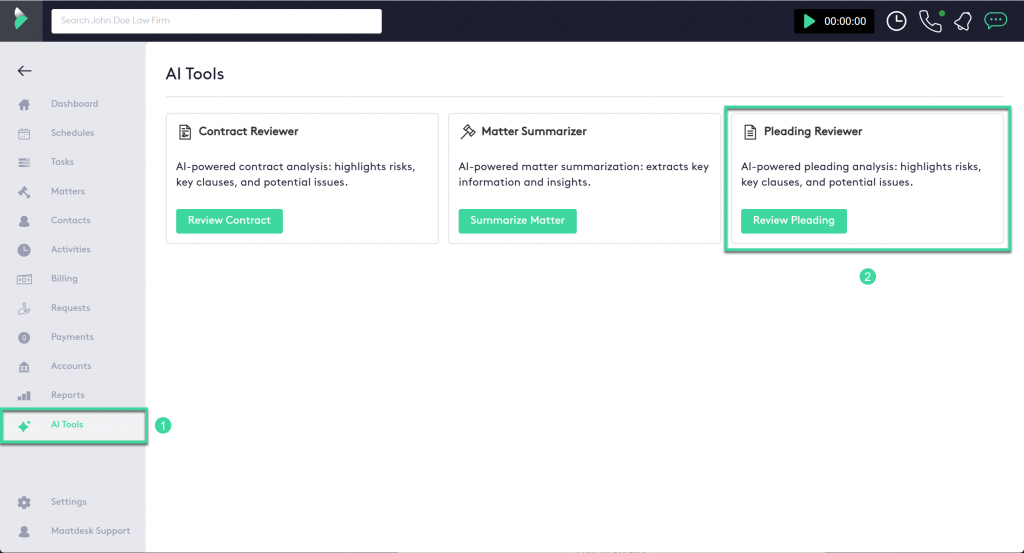
The Pleading Reviewer is easily accessible within your application’s interface:
- Navigate to the AI Tools section on your main dashboard or sidebar.
- Select Pleading Reviewer.
How to Review a Document
After accessing Pleading Reviewer, you will configure your review and upload your document:

- Choose the AI Integration you would like to use (e.g., Gemini)
- Choose the AI Model you would like to use (e.g., gemini-2.5-flash)
- Select the Category of the document (e.g., Initial Pleadings)
- Select the relevant Subcategory (e.g., Counterclaim)
- You can review a document in two ways:
- Click on the Upload Document button.
- OR Click on Paste text of the document you would like to review.
- Click on the confirmation Button.
The AI will instantly generate and display the comprehensive analysis, organized into sections that include key argument extraction, detected procedural risks, and language/style issues.
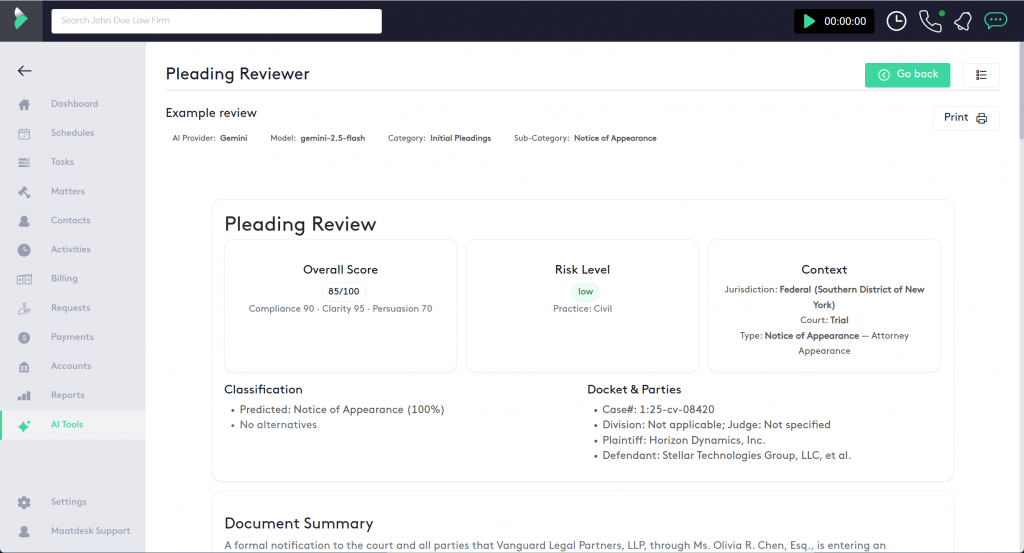
After the contract is reviewed, the AI Response will be automatically saved you can Print it or view the List of AI Responses
Pleading Review Analysis Structure
The Pleading Reviewer provides a comprehensive analysis, broken down into distinct sections to give you actionable insights into your legal document.
Overall Score
This is a summarized, quantitative assessment of the document’s overall quality and strength. It is evaluated across factors like Clarity, Compliance, and Persuasion, providing a benchmark for the document’s readiness.
Risk Level
This qualitative rating (e.g., Low, Moderate, High) indicates the potential procedural or substantive risk the pleading poses. A higher risk level suggests a greater likelihood of the document being rejected, challenged, or leading to adverse legal consequences.
Context
This section defines the document’s specific legal setting. It identifies the governing Jurisdiction, the Court type (e.g., Trial, Appellate), and the legal Practice area (e.g., Civil, Criminal) that were used to determine the applicable rules for the review.
Classification
This confirms the document’s legal identity. The AI verifies the file against its knowledge base to confirm the Type of legal document (e.g., Complaint, Motion, Notice of Appearance) and predicts its accuracy, ensuring the review framework is correctly applied.
Docket & Parties
A snapshot of the case information, including the Case Number and the legal entities involved (Plaintiff, Defendant, etc.), as extracted and verified from the pleading’s caption and body.
Document Summary
A concise, high-level overview of the document’s core purpose, its main arguments, and the specific legal action or Requested Relief it seeks from the court.
Findings & Risks
The core analysis section that identifies potential deficiencies, procedural weaknesses, and critical red flags, complete with explanations (Why it matters) and references to governing rules.
Checklist
A compliance verification section that confirms the presence and accuracy of mandatory legal and procedural elements required for the specific type of document being reviewed, such as proper signatures and court citations.
Recommendations
Actionable, practical steps generated by the AI to address any weaknesses or omissions found in the document, ensuring better compliance and litigation effectiveness.
Citations
A list of all legal rules and statutes (e.g., Federal Rules of Civil Procedure, Local Rules) that were either explicitly referenced in the pleading or used by the AI as the legal framework for the review.
Entities Extracted
This section lists the key elements identified and pulled directly from the document. It breaks down essential information into specific categories such as People, Organizations, Dates, and any Money amounts mentioned.
Category Details
This provides a deeper dive into the technical classification of the document, showing the AI’s analysis across different pleading types (e.g., Motion, Complaint, Answer, Appellate) to ensure all potential elements are accounted for, even if the document isn’t one of those types (as shown by the “N/A” entries).
Notes
A general disclaimer and context section that reminds the user that the AI review is an assistance tool. It emphasizes that legal strategy and final filing decisions always require the professional judgment of an attorney.
Generated At
This simple timestamp records the date and time the AI analysis was performed, providing a record for tracking and document management.