
The Matter Summarizer is an AI tool that summarizes a matter, extracting its key information and insights, so you can get up to speed on a case quickly.
Note. To use AI Tools, you need an AI integration. If you don’t have one, read Managing your AI Integrations, or ask your administrator to give you access to a firm integration.
Summarize a matter from AI Tools
- In the left menu, click AI Tools.
- In Matter Summarizer, click Summarize Matter.
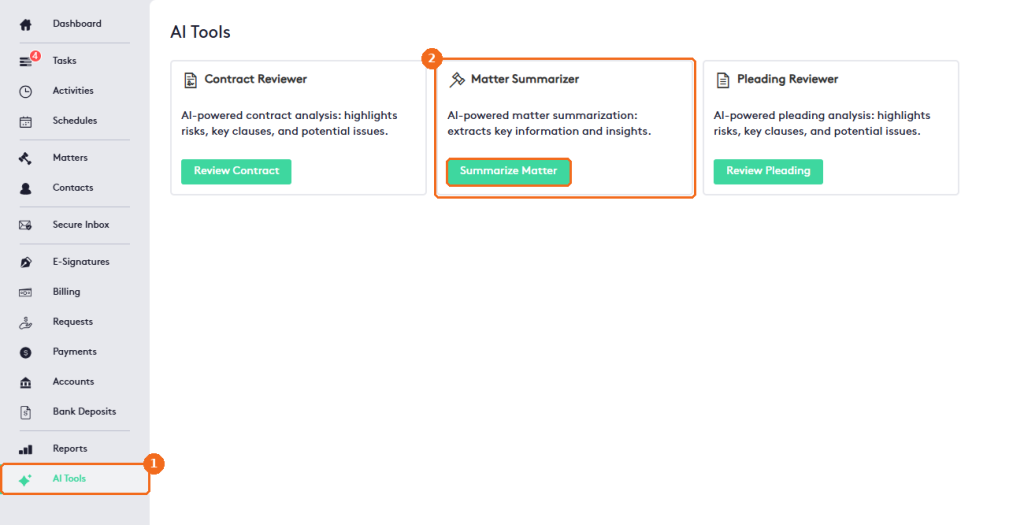
- Select the AI integration to use.
- Select the AI Model of that provider.
- Search for and select the matter.
- Click Summarize Matter.
- When the summary is ready, click Print to print it.
- The list button opens your Saved AI Responses.

The summarizer reads the documents, activities and time entries of the matter. The summary has an executive summary, the key information of the matter (client, status, billing type and responsible attorney), its recent activities and the open action items. Maatdesk saves it automatically to your saved AI responses.
Summarize a matter from its dashboard
You can also summarize a matter without leaving it. Open the matter, then:
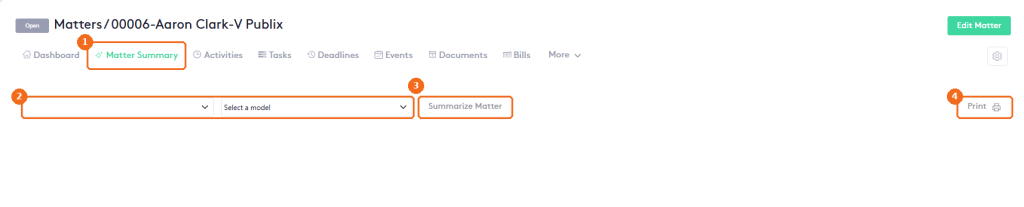
- Click the Matter Summary tab.
- Select the AI integration and the Model.
- Click Summarize Matter.
- Click Print to print the summary.
Note. AI can make mistakes. Always check the result against your documents before you rely on it.