
The Trust tab of the Reports module has the reports you need to review and audit your trust (IOLTA) accounts: client balances, the trust journal, client ledgers, reconciliation history and settlements.
Table of contents
- Trust reports
- Client Balance Summary
- General Trust Journal
- Three-Way Reconciliation History
- Settlement reports
Trust reports
Go to Reports and click the Trust tab.
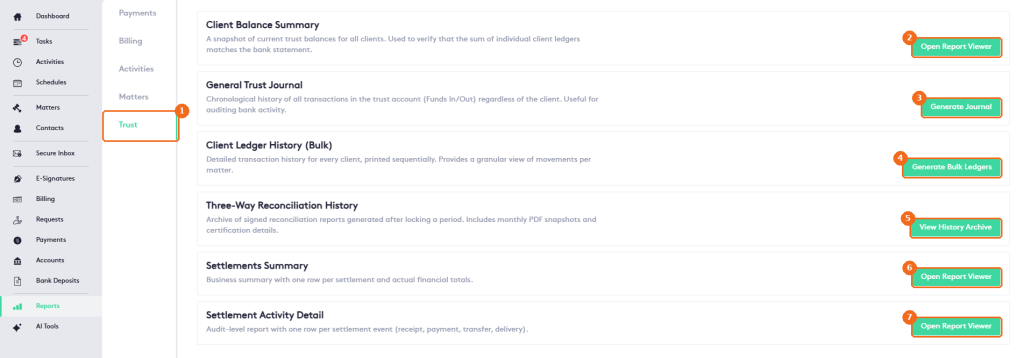
- The Trust tab.
- Client Balance Summary: the current trust balance of every client. Use it to check that the client ledgers add up to the bank statement.
- General Trust Journal: every transaction in the trust account (funds in and out), in date order.
- Client Ledger History (Bulk): the detailed transaction history of every client, one after another.
- Three-Way Reconciliation History: the signed reconciliation reports saved after a period is locked.
- Settlements Summary: one row per settlement, with its totals.
- Settlement Activity Detail: one row per settlement event, such as a receipt, payment, transfer or delivery.
Client Balance Summary
Click Open Report Viewer.
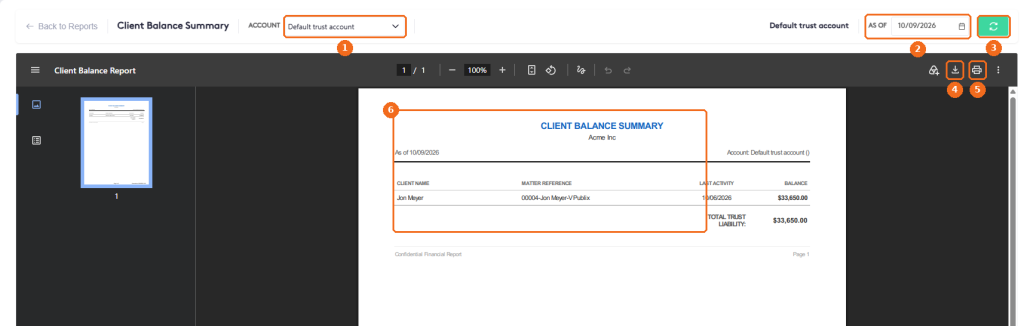
- Select the trust Account.
- Select the As of date.
- Click the refresh button to update the report.
- Download the report as a PDF.
- Print the report.
- The report: each client, the matter, the last activity and the balance, plus the Total Trust Liability.
General Trust Journal
Click Generate Journal.

- Select the trust Account.
- Select the Start and End dates.
- Click the green refresh button.
- The journal: date, reference, type, client and matter, description, funds in, funds out and running balance, with the period totals.
Generate Bulk Ledgers opens the Client Ledger History (Bulk) report, which works the same way: select the Account and the Start and End dates (by default, the last 30 days) and click the refresh button. The report opens in a PDF viewer where you can zoom, download or print it. It shows one section per client and matter, with the Date, Ref #, Description, Funds In, Funds Out and Balance of each transaction and the Ending Balance.
Note. These reports don’t update automatically. After you change the account or a date, click the refresh button to see the new results.
Three-Way Reconciliation History
Click View History Archive.

- Select the trust Account.
- The saved reconciliations: Period Ending, Generated On, Prepared By, Status (for example Balanced) and Actions. Click View to open the reconciliation report as a PDF in a new browser tab.
- The list is empty until a reconciliation period is locked. See Getting started with Trust Reconciliation.
Settlement reports
These reports cover the settlements registered in the Settlement Ledger of contingency fee matters.
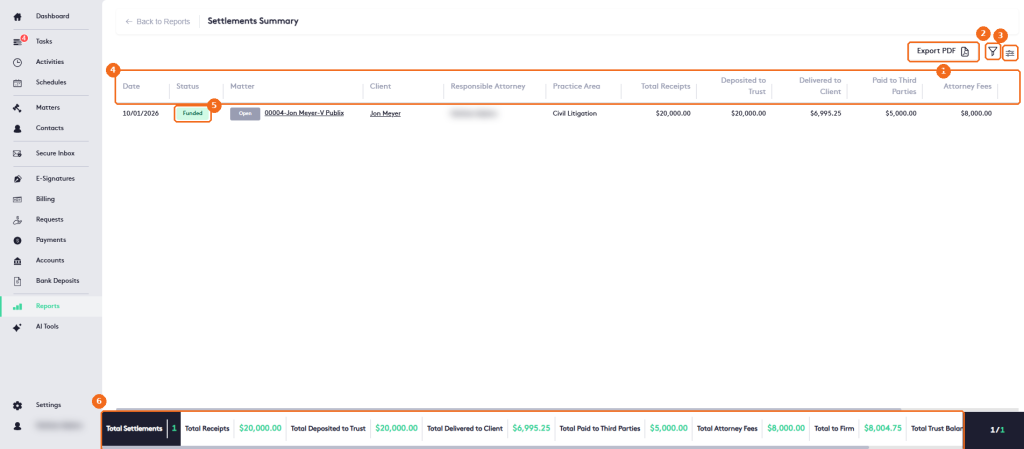
- Export PDF.
- The filter button. Filter by Practice Area, Settlement Status, Matter, Responsible Attorney or Settlement Date.
- The column selector.
- The columns: Date, Status, Matter, Client, Responsible Attorney, Practice Area, Total Receipts, Deposited to Trust, Delivered to Client, Paid to Third Parties, Attorney Fees, Total to Firm and Trust Balance Remaining.
- The status of the settlement: Open, Funded, Distributed or Closed.
- The totals of all settlements.
Settlement Activity Detail lists each settlement event with its Date, Matter, Client, Event Type, Description, Payee / Recipient, Disposition, Account, Reference Number, Amount and Status.