
Law firms often hold property that belongs to their clients: original documents, checks, jewelry, keys or even vehicles. Custody records each item, where it is, who is responsible for it and everything that happened to it, so the firm can account for it at any time, including in an audit.
Table of contents
- Items in custody
- Locations
- Log an item
- Item details
- Chain of custody
- Documents
- Property in custody of a matter
Items in custody
Click Custody in the left menu.
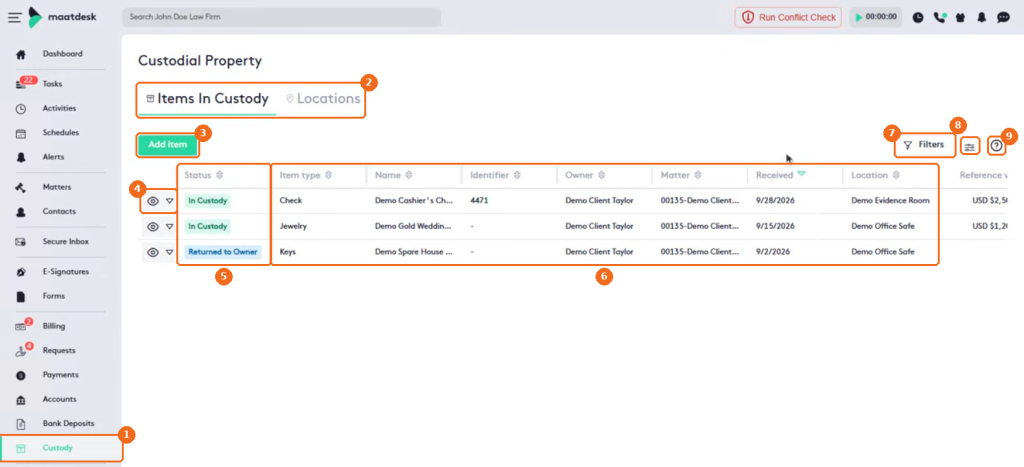
- Custody in the left menu.
- The tabs: Items In Custody and Locations.
- Add item logs a new item.
- The view button and the actions arrow of the item.
- The Status, for example In Custody or Returned to Owner.
- The item type, name, identifier, owner, matter, received date and location.
- Filters narrows the list by type, owner, matter, status or location.
- The column selector.
- Help.
The list also shows the reference value of each item.
Locations
Click the Locations tab to define where items are kept, such as an office safe or an evidence room.
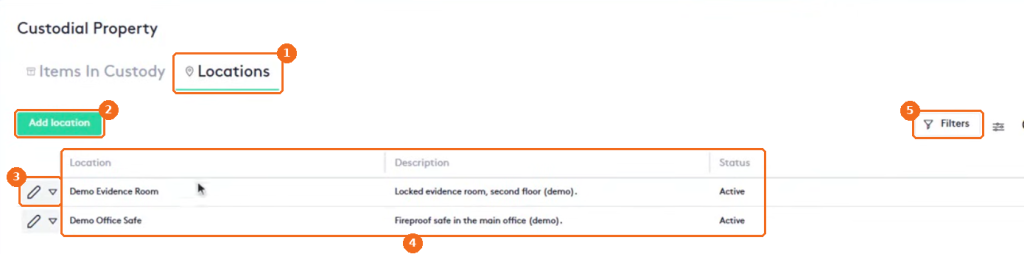
- The Locations tab.
- Add location creates a location.
- The edit button and the actions arrow of the location.
- Each location has a name, a description and a status.
- Filters.
Log an item
Click Add item and select the item type. The form changes with the type: a check asks for its number, payer and payee; a vehicle for its VIN.
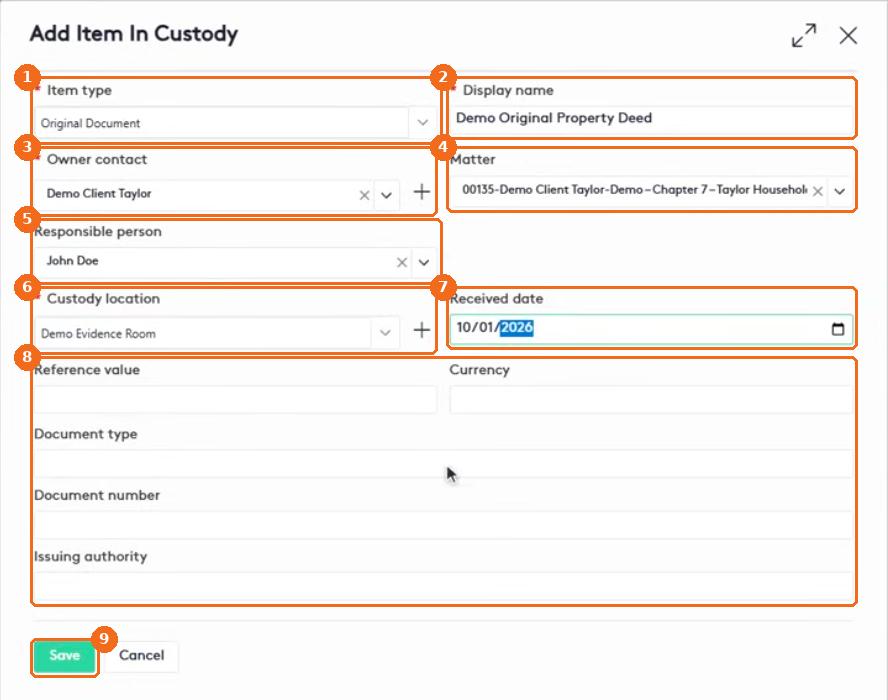
- Select the Item type (required), for example Original Document, Check, Jewelry or Keys.
- Enter the Display name (required).
- Select the Owner contact (required). Click + to create a contact.
- Select the owner’s Matter.
- Select the Responsible person.
- Select the Custody location (required). Click + to create a location.
- Enter the Received date.
- Enter the details for this type of item, for example the Document type.
- Click Save.
Item details
Click the view button of an item.
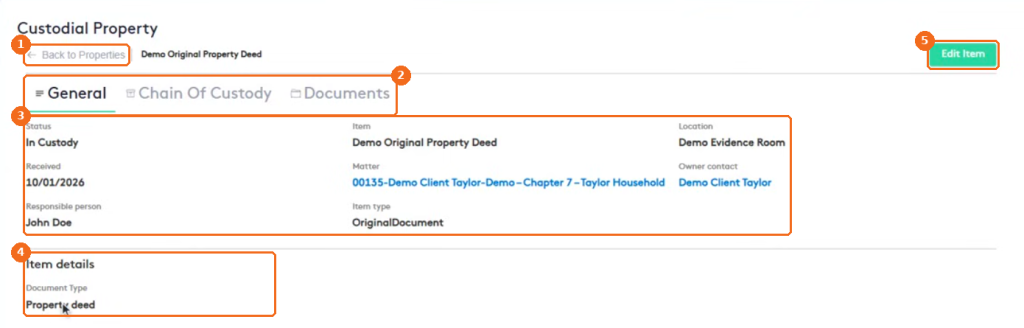
- Back to Properties returns to the list.
- The tabs: General, Chain Of Custody and Documents.
- The status, item, location, received date, matter, owner contact, responsible person and item type.
- Item details: the fields for this type of item.
- Edit Item changes the item.
Chain of custody
The Chain Of Custody tab is the history of the item. To record something new, click Change status.
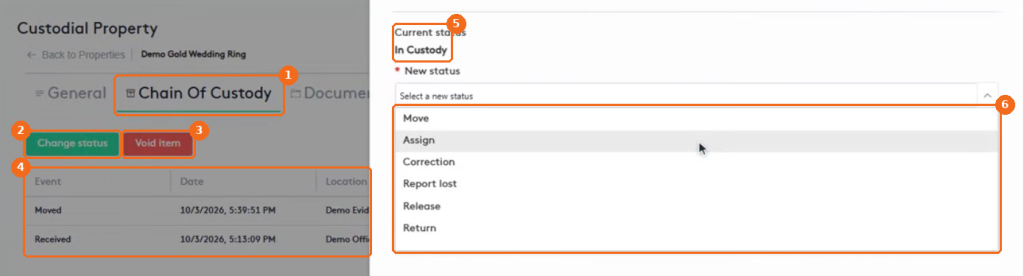
- The Chain Of Custody tab.
- Change status records a new event.
- Void item marks an item logged by mistake.
- The events, newest first, with the date, location and notes.
- The Current status of the item.
- The new status: Move, Assign, Correction, Report lost, Release or Return.
| Action | What it records |
|---|---|
| Move | The item goes to another location. |
| Assign | A new responsible person. |
| Release | The item is handed to a third party. Records who received it. |
| Return | The item is given back to its owner. Records who received it. |
| Report lost | The item is missing. Requires a reason. |
For example, to move an item to another location:
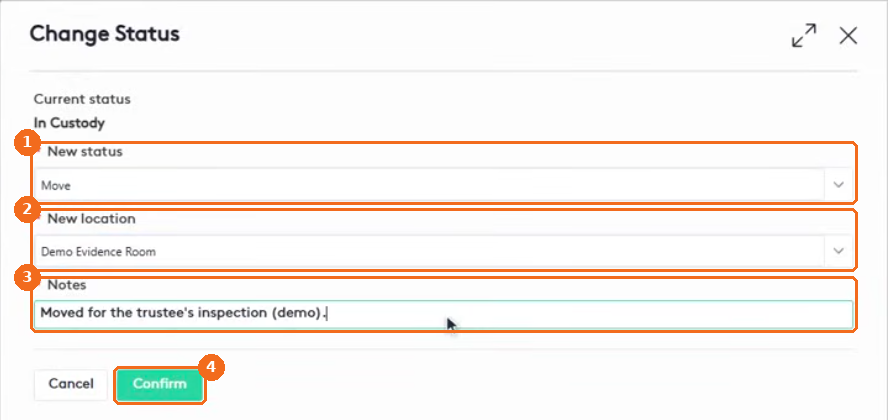
- Select Move.
- Select the New location.
- Enter the Notes (required).
- Click Confirm. The new event appears at the top of the chain of custody.
Note. Void item also requires a reason and can’t be undone. A voided item stays in the history, but no further actions are allowed. Logging a check in custody doesn’t deposit it or change trust balances.
Documents
On the Documents tab, link the paperwork that goes with the item, such as an intake receipt or a photo.

- The Documents tab.
- Click Link document.
- Select the Source: the documents of the Owner contact or of the Matter.
- Select the folder and the document.
- Enter the Notes (required).
- Check Primary for the main file of the item.
- Click Link document.
Property in custody of a matter
Every matter has a Property In Custody tab with the items held for that matter.
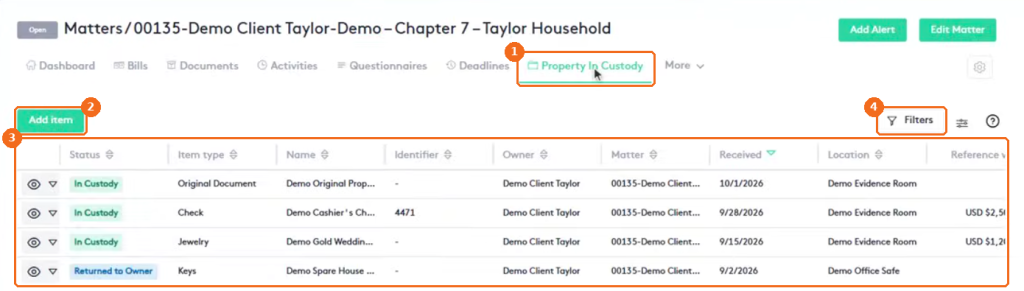
- The Property In Custody tab of the matter.
- Add item logs an item for this matter.
- The items held for the matter.
- Filters.
Note. Custody depends on the Custodial Property permissions of the user’s role: read, create and edit custodial property, manage custody events, release, void, view sensitive check details and manage custody locations. See Managing Groups, Roles and Job Titles.