
Maatdesk questionnaires use forms from JotForm. Connect your firm’s own JotForm account by saving its API key, so you can use your forms as questionnaire templates.
Connect your JotForm account
In JotForm, open the Account API page, click Create New Key and copy the key. The Permissions column sets the key to Read Access or Full Access. Then, in Maatdesk, click Settings in the left menu, then click JotForm Integration.
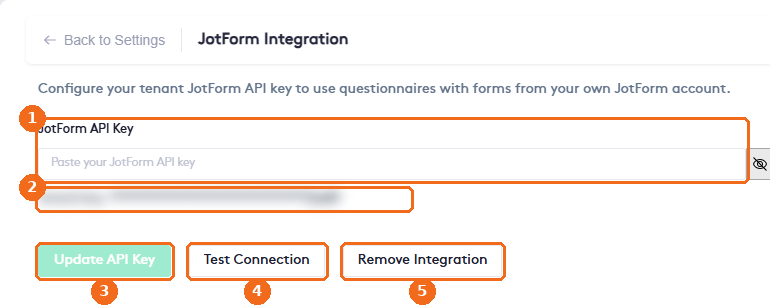
- Paste the key in JotForm API Key. Click the eye button to show or hide it.
- When a key is saved, Maatdesk shows only its last characters in Saved key.
- Click Update API Key to save the key. The button is active only after you paste a key.
- Test Connection checks the saved key. A success message appears at the top of the page when the connection works.
- Remove Integration deletes the saved key and disconnects JotForm.
Once the key is saved, add your forms as questionnaire templates. See Managing Questionnaire Templates.
Note. Keep the API key private. Anyone with the key can access the forms and submissions of your JotForm account.