
Register your firm’s IP desk phones in Maatdesk so users can place calls from Maatdesk through their own phone. Each phone is identified by its IP address and extension.
The IP Phones list
Click Settings in the left menu, then click IP Phones.

- Add Ip Phone registers a phone.
- The columns: IP, Provider Brand, Provider Model and Extension.
- The filter button.
- Help.
Add an IP phone
Click Add Ip Phone. All fields are required.
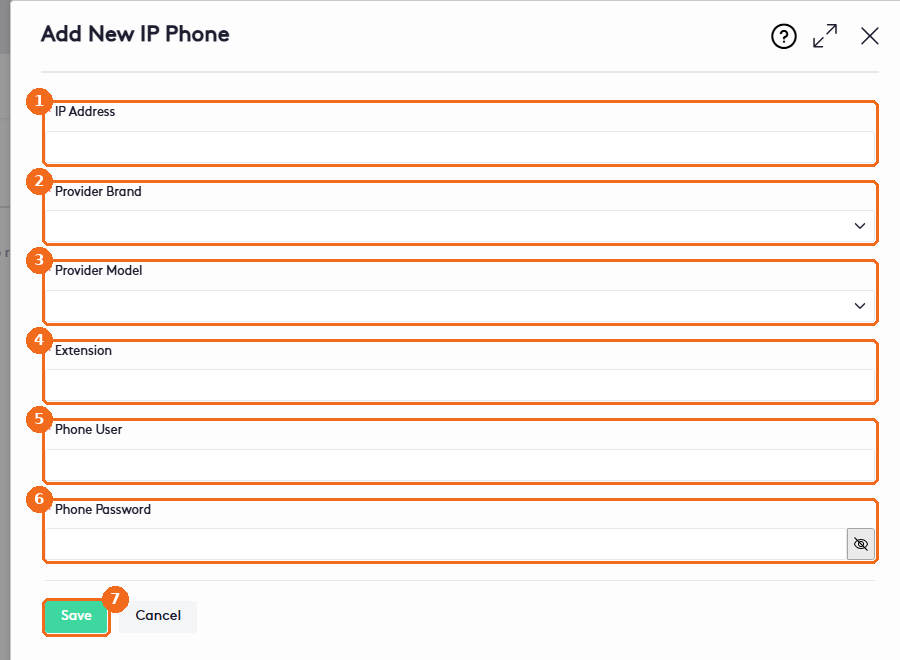
- Enter the IP Address of the phone on your network.
- Select the Provider Brand: Yealink, Polycom or Grandstream.
- Select the Provider Model. The list depends on the brand; for example, Yealink offers T54W, T46S and SIP-T31P.
- Enter the Extension of the phone.
- Enter the Phone User used to sign in to the phone’s web interface.
- Enter the Phone Password. Click the eye button to show or hide it.
- Click Save.
Then link the extension to its user: open Managing Users, edit the user and enter the same Extension in Phone Ip Configuration (If Needed).
Note. To manage IP phones, a user needs the Manage IP Phone permission in their role. See Managing Groups, Roles and Job Titles.