
The document storage strategy decides where the documents of your matters are stored: in the Maatdesk built-in storage or in your firm’s Google Shared Drives.
Choose where documents are stored
Click Settings in the left menu, then click Document Storage Strategy..
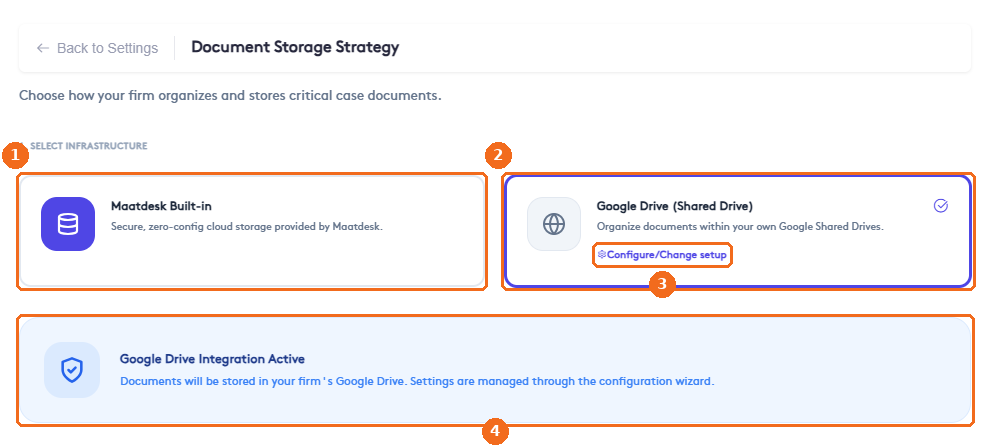
- Maatdesk Built-in: secure cloud storage provided by Maatdesk. No setup is needed.
- Google Drive (Shared Drive): documents are stored in your own Google Shared Drives. The selected option is outlined and checked.
- Configure/Change setup opens the Google Drive configuration wizard.
- The status of the current setup, for example Google Drive Integration Active.
Change the storage location
Before the wizard starts, Maatdesk shows what changes.
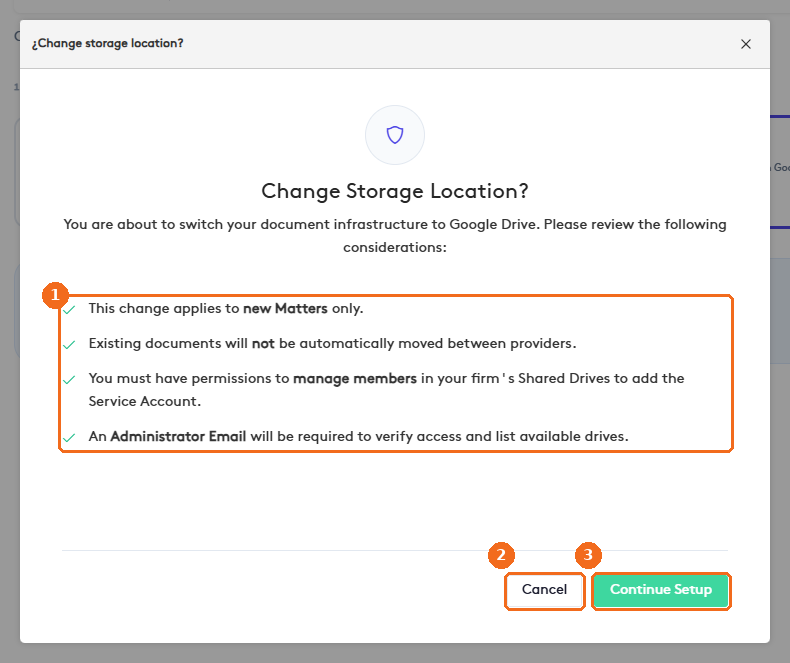
- Read the considerations: the change applies to new matters only, existing documents are not moved between providers, you need permission to manage members of your Shared Drives to add the Maatdesk service account, and an administrator email is required to verify access.
- Cancel keeps the current setup.
- Continue Setup starts the wizard.
Note. Plan the change with your Google Workspace administrator. Documents already stored stay where they are.