
The Reports module gives you ready-made reports on payments, billing, activities, matters and trust accounts. You can filter and group the data, and export each report to PDF.
Table of contents
Find a report
Click Reports in the left menu.
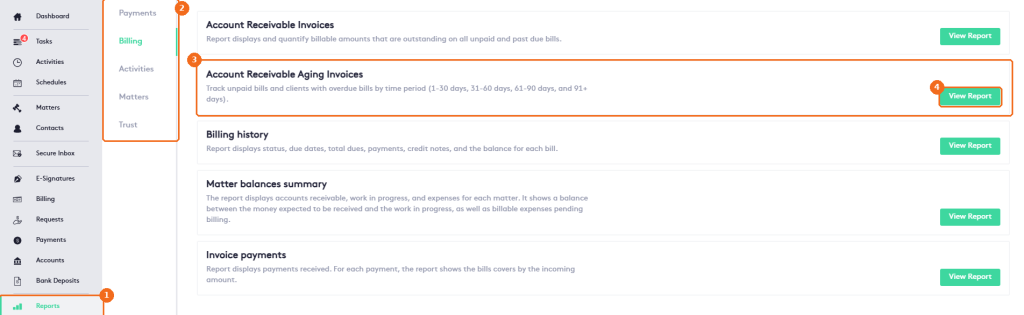
- Reports in the left menu.
- The report tabs: Payments, Billing, Activities, Matters and Trust.
- Each card shows the report name and what it displays.
- Click View Report to open the report.
| Tab | Reports |
|---|---|
| Payments | Payments by Method. |
| Billing | Account Receivable Invoices, Account Receivable Aging Invoices, Billing history, Matter balances summary and Invoice payments. |
| Activities | Activities Over Time, Activities by Client, Activities by Matter and Productivity Report. |
| Matters | Matters Over Time and Matters A/R Aging. |
| Trust | Client Balance Summary, General Trust Journal, Client Ledger History (Bulk), Three-Way Reconciliation History, Settlements Summary and Settlement Activity Detail. See Trust Reports Overview. |
Parts of a report
Most reports share the same layout. This example is the Account Receivable Aging Invoices report.
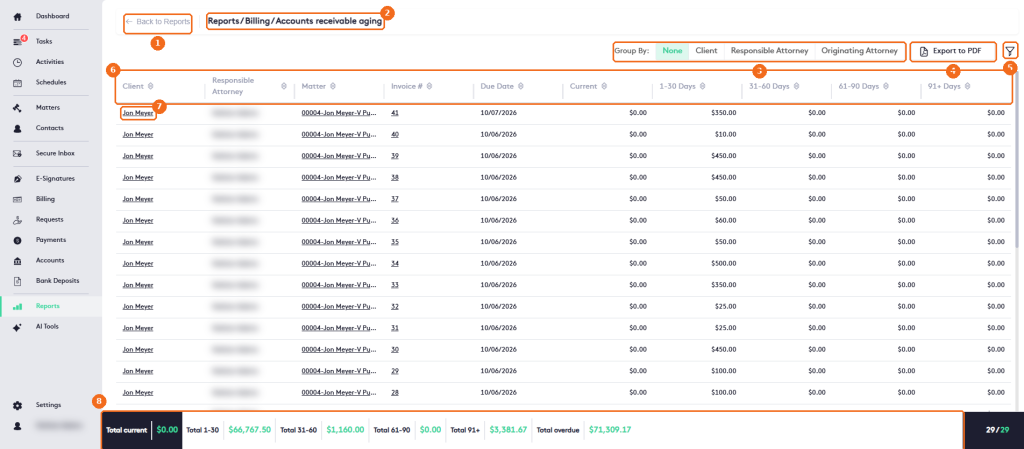
- Back to Reports returns to the report list.
- The tab and the name of the report.
- Group By groups the rows, for example by Client or Responsible Attorney. Select None to remove the grouping.
- Export to PDF saves or prints the report. Allow pop-up windows in your browser.
- The filter button opens the filters.
- The columns. Click a column name to sort the rows.
- Underlined names open the client, matter or invoice.
- The totals of the report.
Activity reports, such as Activities Over Time, group the rows by date. Each group shows its number of items and a subtotal; click the group to collapse or expand it. The columns are Date, Matter, Client, Type, Billed by, Status, Charge, Hours, Rate($/h) and Amount($), and the footer shows the billable amount and hours, and the billed, unbilled, non-billable and non-charge totals.
Filter a report
Click the filter button. The filters change by report.
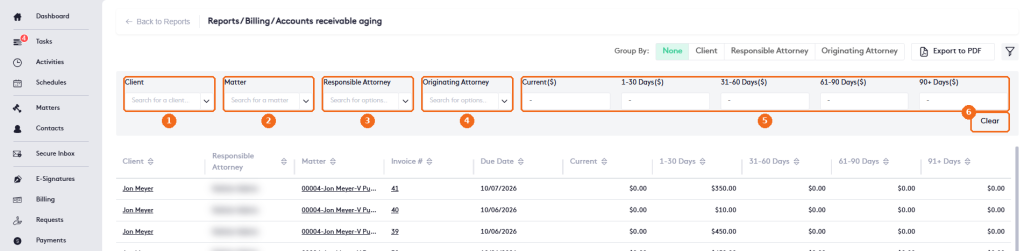
- Client.
- Matter.
- Responsible Attorney.
- Originating Attorney.
- Amount ranges for each aging period.
- Clear resets the filters.
Charts
Some reports include a chart, for example Payments by Method.
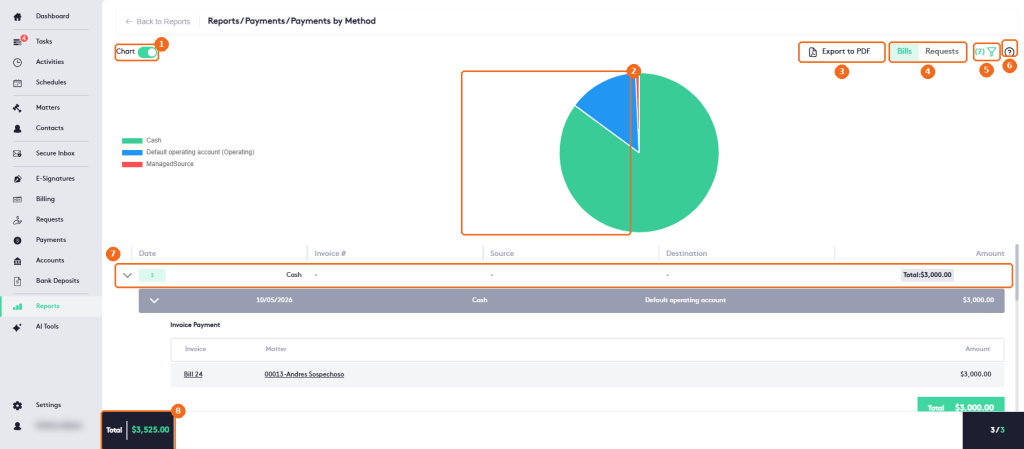
- Turn on Chart to show the chart.
- The chart, with its legend.
- Export to PDF.
- Show payments of Bills or Requests.
- The filter button, with the number of active filters.
- Help.
- Each payment method is a group. Click the arrow to show or hide its payments.
- The Total of the report.