
Choose which Maatdesk events notify you, and whether you get them by email, in the app, or both. These settings are personal: each user sets their own.
Open your Profile and click the Notifications tab.
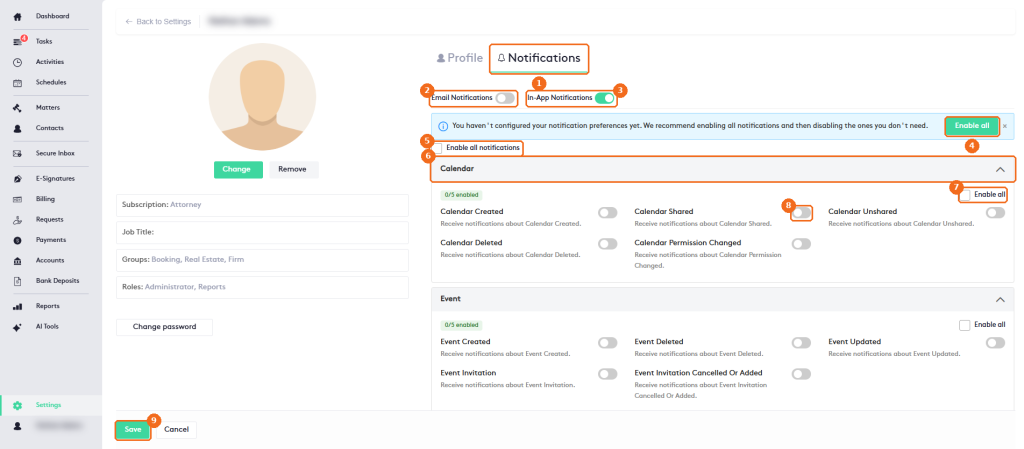
- The Notifications tab.
- Email Notifications sends notifications to your email.
- In-App Notifications shows them at the top of Maatdesk.
- Enable all turns on all notifications. You can then turn off the ones you don’t need. Until you set your preferences, a banner reminds you: You haven’t configured your notification preferences yet.
- Enable all notifications does the same with a check box.
- Each category, with the number of notifications enabled. Click the arrow to collapse it.
- Enable all turns on every notification of the category.
- The switch of each notification.
- Click Save.
| Category | Notifications |
|---|---|
| Calendar | Calendar Created, Calendar Shared, Calendar Unshared, Calendar Deleted, Calendar Permission Changed. |
| Event | Event Created, Event Deleted, Event Updated, Event Invitation, Event Invitation Cancelled Or Added. |
| Permission | Permission Changed. |
| Invoice | Bill Created, bill submitted for approval, Bill Approved, Bill Deleted, Request Created, request submitted for approval, Request Approved, Request Deleted. |
| Questionnaire | Client submission completed. |
Further down, in the Email Digest section, select Enable Email Digest to get a periodic summary instead of individual emails. Set the Frequency (for example Daily), the Time (9:00 AM by default) and your Timezone.
Note. Changes apply only after you click Save.