
Relation types describe how two contacts are related, for example Employer and Employee or Parent and Child. You use them when you link contacts in the Relationships of a contact.
Table of contents
The Relation Types list
Click Settings in the left menu, then click Relation Types.
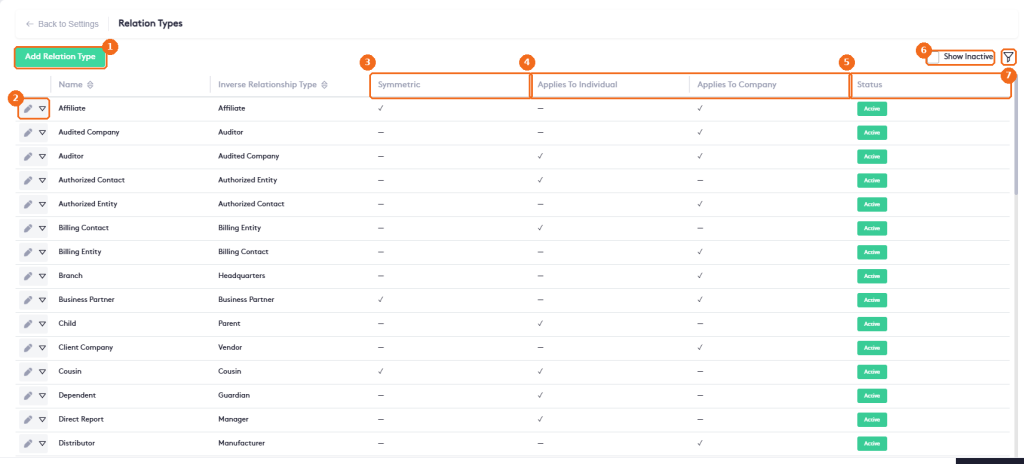
- Add Relation Type creates a type.
- The edit button and the actions arrow of the type. The actions arrow has Delete.
- Symmetric: the relation is the same in both directions, for example Friend or Business Partner.
- Applies To Individual and Applies To Company: the kind of contact the type can be used for.
- The Status of the type.
- Show Inactive also lists inactive types.
- The filter button. Filter the list by Name; Clear removes the filter. The button shows how many filters are set.
The Inverse Relationship Type is the type shown on the other contact. For example, when a contact is the Employer of another, the other contact shows Employee. When you select an inverse type, Maatdesk sets the inverse on both types, so you can create the pair in any order.
Add a relation type
Click Add Relation Type.
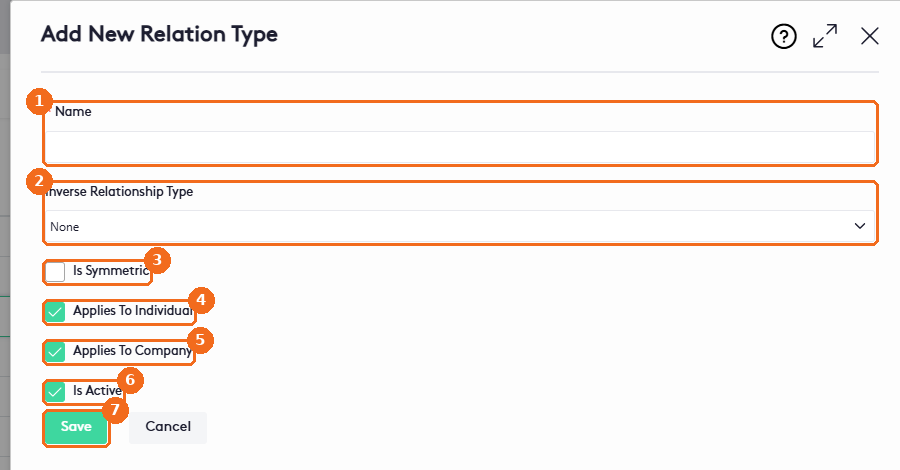
- Enter the Name (required).
- Select the Inverse Relationship Type, or leave None.
- Check Is Symmetric if the relation is the same in both directions.
- Check Applies To Individual to use it with people.
- Check Applies To Company to use it with companies.
- Uncheck Is Active to hide the type from new relationships.
- Click Save.
To change a type, including a predefined one, click its edit button. The Edit Relation Type panel has the same fields.
Deactivate or delete a relation type
To stop using a type without removing it, edit it, uncheck Is Active and click Save. The type is hidden from the list; select Show Inactive to see it again.
To delete a type:
- Click the actions arrow of the type and select Delete.
- In Delete Relation Type (Are you sure you want to delete relation type followed by the name), click Yes.
Warning. Delete is available for every type, including predefined types and types already used in contact relationships. If contacts use a type, uncheck Is Active instead of deleting it.